AI headshot prompts for a professional LinkedIn photo
Turn an ordinary selfie into a clean, believable business headshot with a free AI image tool. Twelve prompts for different jobs and looks, each with a negative prompt.
Image1 reference photoNegative prompts
Overview
What is an AI headshot?
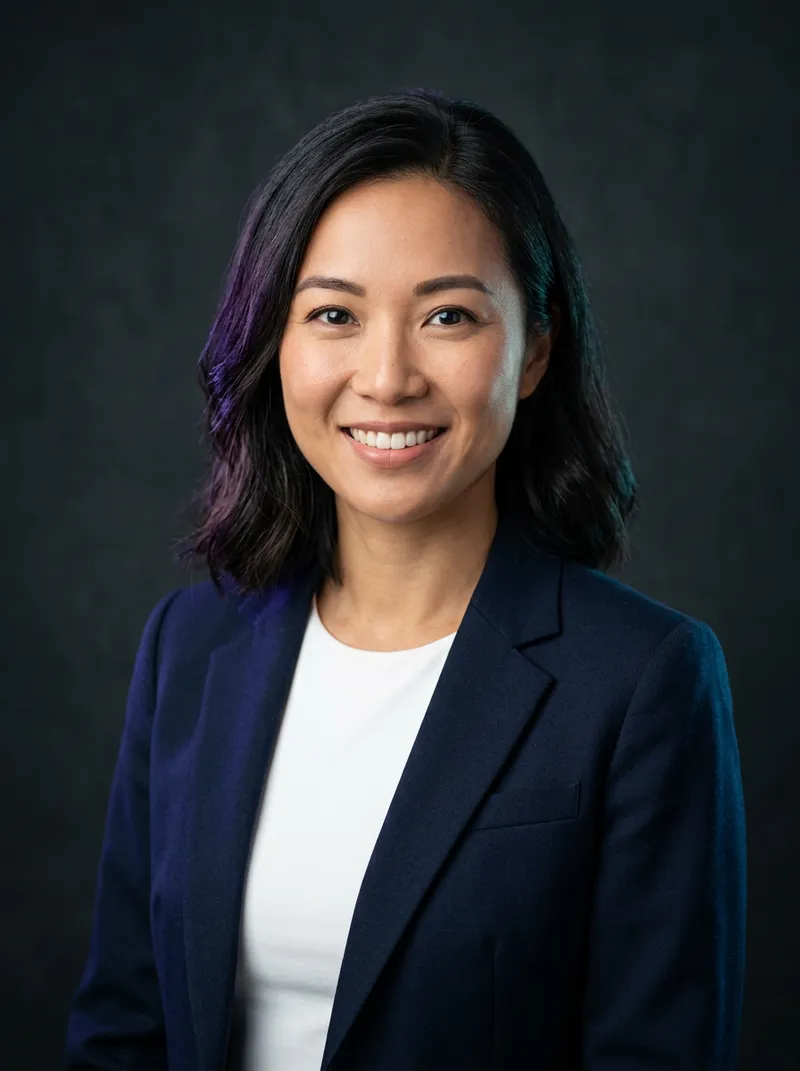
An AI headshot is a professional-looking portrait made by an image model from your own photo. You upload a clear selfie as a reference, describe the result you want (outfit, backdrop, light, framing), and the model redraws you as if you had booked a studio session. Done well, it keeps your face, hair and skin tone and only changes the things a photographer would change: lighting, background, clothes and pose.
People use AI headshots for LinkedIn profiles, CVs, conference speaker pages, company “About us” pages and freelance marketplaces. They are fast and cheap, but they work best as a stand-in or a starting point. If an employer, ID office or client needs an unedited photo of you, use a real photo.
Keep it honest. A headshot should still look like you on a video call. Don't change your age, ethnicity or body, and never use someone else's photo. For passports, visas and official IDs, use a real photo that meets the official rules.
How to
How to make an AI headshot for free
Take a good reference selfie
Face the window, hold the phone at eye level, relax your face and fill most of the frame with head and shoulders. No sunglasses, hats or beauty filters.
Open a tool that accepts a reference photo
Gemini, ChatGPT, Doubao and Jimeng all let you upload a photo and describe changes. Free tiers are usually enough for a few headshots.
Upload the selfie and paste a prompt
Copy one prompt below. Keep the first sentence (it tells the model to keep your identity) and change the outfit or backdrop if you like.
Add the negative prompt
Paste it in the tool's negative or 'avoid' field, or at the end of your message if there is no such field.
Pick, then check at small size
Generate 3–4 versions. Look at each one at thumbnail size, the way LinkedIn shows it, and choose the one that is most clearly you.
Guide
A practical guide to better AI headshots
Start with the right selfie
The reference photo sets the ceiling for the result. Stand facing a window during the day so the light is soft and even, hold the camera at eye level (not below the chin), and leave a little space above your head. Use the rear camera if you can, because front cameras often smooth skin and widen faces. Take five or six shots and pick the sharpest one with a relaxed, natural expression.
Tell the model what to keep
The most important line in a headshot prompt is the one that protects your identity: 'keep the person's face, hairline, skin tone and features exactly as in the reference'. Without it, many models drift toward a generic 'stock photo' face. Every prompt on this page starts with that sentence, so keep it when you edit.
Choose a backdrop that matches your field
Recruiters and clients read the background before they read your title. Plain grey or navy reads corporate and finance; a softly blurred modern office reads tech and startups; a warm, light backdrop reads healthcare, coaching and education; a coloured backdrop reads creative. One simple background is better than an elaborate scene.
Frame it the way LinkedIn crops it
Profile photos are shown as small circles, so ask for head and shoulders with your face filling about 60% of the frame and eyes about one third from the top. Square (1:1) output avoids awkward crops. If the tool only makes portrait images, crop afterwards so your face is centred.
Fix common problems
If teeth or eyes look strange, regenerate with 'closed-mouth smile'. If skin looks plastic, add 'visible natural skin texture, no retouching'. If the face changes, upload a second reference photo or shorten the prompt so the identity line carries more weight. Finally, compare the result with a normal photo of you; if a friend would hesitate to recognise you, try again.
Prompts
12 copy-ready AI headshot prompts
Every prompt assumes you uploaded one clear selfie. The negative prompt is included in the copy.
12 of 12 shown
#01
Classic corporate, grey backdrop
Using the uploaded photo as the face reference, keep the person's face, hairline, skin tone and features exactly the same. Professional corporate headshot, head and shoulders, wearing a tailored charcoal suit jacket over a plain white shirt, confident relaxed smile, looking straight at the camera. Seamless mid-grey studio backdrop, soft key light from the front-left with a gentle fill, subtle hair light, 85mm lens, f/4, sharp eyes, natural skin texture, square 1:1 crop.

Negative prompt: cartoon, illustration, plastic or over-smoothed skin, distorted face, changed identity, asymmetrical eyes, extra fingers, crooked teeth, heavy makeup, harsh shadows, busy background, text, watermark, logo
Using the uploaded photo as the face reference, keep the person's identity and features unchanged. Natural-light professional headshot, head and shoulders, wearing a simple navy knit sweater, warm genuine smile. Large window light from the side, light beige wall behind, airy and bright, 85mm, f/2.8, background softly out of focus, true-to-life skin, approachable and friendly mood, 1:1.

Negative prompt: cartoon, illustration, plastic or over-smoothed skin, distorted face, changed identity, asymmetrical eyes, extra fingers, crooked teeth, heavy makeup, harsh shadows, busy background, text, watermark, logo
Using the uploaded photo as the face reference, keep the face, hair and skin tone exactly as in the reference. Modern tech-company headshot, chest-up, wearing a plain dark crew-neck t-shirt under an unstructured blazer, relaxed confident expression. Background is a bright open-plan office with plants and glass, heavily blurred bokeh, cool daylight, 50mm, f/2, clean colour grade, 1:1.

Negative prompt: cartoon, illustration, plastic or over-smoothed skin, distorted face, changed identity, asymmetrical eyes, extra fingers, crooked teeth, heavy makeup, harsh shadows, busy background, text, watermark, logo
officetech
中文版 Chinese version
以上传照片作为人脸参考,脸、发型和肤色与参考照完全一致。现代互联网公司风格职业照,胸部以上,深色圆领 T 恤外搭休闲西装,放松自信的表情。背景是明亮的开放式办公室,有绿植和玻璃隔断,强烈虚化,冷调日光,50mm,f/2,干净的调色,1:1。

反向提示词:卡通,插画,塑料感或过度磨皮的皮肤,五官变形,不像本人,眼睛不对称,多余手指,牙齿歪斜,浓妆,生硬阴影,杂乱背景,文字,水印,标志
#04
Executive, dark dramatic light
Using the uploaded photo as the face reference, keep the person's identity unchanged. Executive portrait, head and shoulders, dark suit, crisp shirt, calm assured expression with a slight smile. Deep charcoal backdrop, Rembrandt lighting with a soft triangle of light on the cheek, subtle rim light separating the shoulders from the background, 105mm, f/5.6, high detail, refined and premium, 1:1.

Negative prompt: cartoon, illustration, plastic or over-smoothed skin, distorted face, changed identity, asymmetrical eyes, extra fingers, crooked teeth, heavy makeup, harsh shadows, busy background, text, watermark, logo
Using the uploaded photo as the face reference, keep the features and skin tone exactly as in the reference. Outdoor environmental headshot, chest-up, wearing a light grey blazer over a plain top, natural smile. Standing in a quiet city park with trees and soft greenery far behind, late-afternoon open shade, gentle warm light, 85mm, f/2, creamy background blur, realistic and fresh, 1:1.

Negative prompt: cartoon, illustration, plastic or over-smoothed skin, distorted face, changed identity, asymmetrical eyes, extra fingers, crooked teeth, heavy makeup, harsh shadows, busy background, text, watermark, logo
Using the uploaded photo as the face reference, keep the person's identity unchanged. Creative-professional headshot, head and shoulders, wearing a simple black turtleneck, friendly confident look. Solid muted teal paper backdrop, soft even beauty-dish light, slight shadow behind the subject, 85mm, f/5.6, modern editorial look, natural skin, 1:1.

Negative prompt: cartoon, illustration, plastic or over-smoothed skin, distorted face, changed identity, asymmetrical eyes, extra fingers, crooked teeth, heavy makeup, harsh shadows, busy background, text, watermark, logo
Using the uploaded photo as the face reference, keep the face and features exactly the same. Healthcare professional headshot, chest-up, wearing a clean white lab coat over light blue scrubs, kind reassuring smile. Soft light-grey backdrop, bright even lighting, 85mm, f/4, clean and trustworthy look, natural skin texture, no name badge, 1:1.

Negative prompt: cartoon, illustration, plastic or over-smoothed skin, distorted face, changed identity, asymmetrical eyes, extra fingers, crooked teeth, heavy makeup, harsh shadows, busy background, text, watermark, logo
Using the uploaded photo as the face reference, keep the person's identity unchanged. Warm, approachable business headshot, waist-up, arms relaxed, wearing a smart-casual blazer in a soft colour, big natural smile showing confidence. Bright modern interior with neutral tones blurred behind, warm daylight, 50mm, f/2.2, inviting and upbeat, 4:5 portrait.

Negative prompt: cartoon, illustration, plastic or over-smoothed skin, distorted face, changed identity, asymmetrical eyes, extra fingers, crooked teeth, heavy makeup, harsh shadows, busy background, text, watermark, logo
Using the uploaded photo as the face reference, keep the features exactly as in the reference. Black-and-white editorial headshot, head and shoulders, dark shirt, thoughtful confident expression. Plain dark grey backdrop, single soft side light with deep but gentle shadows, fine film grain, 85mm, f/4, timeless magazine portrait, natural skin texture, 1:1.

Negative prompt: cartoon, illustration, plastic or over-smoothed skin, distorted face, changed identity, asymmetrical eyes, extra fingers, crooked teeth, heavy makeup, harsh shadows, busy background, text, watermark, logo
Using the uploaded photo as the face reference, keep the person's identity unchanged. Speaker-profile headshot, chest-up, wearing a smart blazer, engaged open expression as if about to speak. Dark background with soft out-of-focus purple and blue stage lights, subtle rim light on hair and shoulders, 85mm, f/2, polished event-programme look, 1:1.

Negative prompt: cartoon, illustration, plastic or over-smoothed skin, distorted face, changed identity, asymmetrical eyes, extra fingers, crooked teeth, heavy makeup, harsh shadows, busy background, text, watermark, logo
Using the uploaded photo as the face reference, keep the face and features exactly the same. Academic headshot, chest-up, wearing a simple cardigan or blazer over a collared shirt, calm intelligent expression with a light smile. Softly blurred bookshelves in a warm library behind, gentle window light, 85mm, f/2.8, natural and credible, 1:1.

Negative prompt: cartoon, illustration, plastic or over-smoothed skin, distorted face, changed identity, asymmetrical eyes, extra fingers, crooked teeth, heavy makeup, harsh shadows, busy background, text, watermark, logo
Using the uploaded photo as the face reference, keep the person's identity unchanged. Company team-page headshot in a consistent house style: head and shoulders, centred, eyes one third from the top, wearing business-casual clothes in neutral colours, friendly closed-mouth smile. Seamless light-grey backdrop, identical soft front lighting, 85mm, f/5.6, 1:1. Use exactly the same framing, backdrop and light for every person so the team photos match.

Negative prompt: cartoon, illustration, plastic or over-smoothed skin, distorted face, changed identity, asymmetrical eyes, extra fingers, crooked teeth, heavy makeup, harsh shadows, busy background, text, watermark, logo
Yes, as long as it is a fair likeness of you. LinkedIn asks for a photo that represents you; it does not ban AI-edited images. If it looks noticeably younger, slimmer or different from you, people will notice on the first video call.
What makes an AI headshot look fake?
Over-smooth skin, perfect symmetry, glowing eyes and an unrealistic blurred background. Ask for natural skin texture and a simple studio or office background, and use the negative prompt.
How many reference photos do I need?
One sharp, front-facing selfie is enough for most tools. If a tool accepts several, add two or three from slightly different angles taken in similar light.
Is it free?
Gemini, ChatGPT, Doubao and Jimeng all offered free use for image editing at the time of writing, with daily or monthly limits. Limits change, so check each tool's current plan.
Does drawcue store my selfie?
No. drawcue only gives you text prompts. You upload your photo directly to the AI tool you choose, under that tool's privacy policy.
Can I use it for a passport or ID photo?
No. Official photos must be unedited real photos taken under specific rules. Use AI headshots only for profiles and websites.